27 10 月, 2008
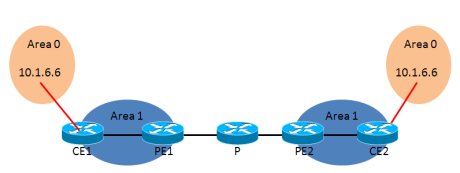
CE与PE之间的OSPF
CE2
router ospf 1
 router-id 10.1.6.6
 log-adjacency-changes
 network 10.1.6.6 0.0.0.0 area 0
 network 10.1.46.0 0.0.0.255 area 1
 !
CE2#sh ip route
Codes: C - connected, S - static, R - RIP, M - mobile, B - BGP
D - EIGRP, EX - EIGRP external, O - OSPF, IA - OSPF inter area
N1 - OSPF NSSA external type 1, N2 - OSPF NSSA external type 2
E1 - OSPF external type 1, E2 - OSPF external type 2
i - IS-IS, su - IS-IS summary, L1 - IS-IS level-1, L2 - IS-IS level-2
ia - IS-IS inter area, * - candidate default, U - per-user static route
o - ODR, P - periodic downloaded static route

Gateway of last resort is not set

10.0.0.0/24 is subnetted, 3 subnets
C       10.1.6.0 is directly connected, Loopback0
C       10.1.46.0 is directly connected, Ethernet0/0
O E2    10.1.38.0 [110/1] via 10.1.46.4, 02:11:33, Ethernet0/0
完整阅读
26 10 月, 2008
过滤VPNv4的路由
最好设置export来控制,比较直接,更改import是被动的。
以下只是简单说明了过滤的基本用法,具体问题还要具体分析,但方法是一样的
Rack1R3(config)#ip prefix-list per7 permit 10.1.7.0/24
Rack1R3(config)#route-map per7
Rack1R3(config-route-map)#match ip add prefix-list per7
Rack1R3(config-route-map)#set extcommunity rt 1:68
Rack1R3(config-route-map)#set extcommunity rt 1:68 ?
ASN:nn or IP-address:nn  VPN extended community
additive                 Add to the existing extcommunity
<cr>
Rack1R3(config-route-map)#set extcommunity rt 1:68 add
Rack1R3(config-route-map)#end
Rack1R3#
Rack1R3(config)#ip vrf r5-sw1
Rack1R3(config-vrf)#export map per7
Rack1R3(config-vrf)#end
Rack1R3#clear ip bgp * sof
Rack1R4#sh ip bgp vpn all
BGP table version is 30, local router ID is 10.1.4.4
Status codes: s suppressed, d damped, h history, * valid, > best, i - internal,
r RIB-failure, S Stale
Origin codes: i - IGP, e - EGP, ? - incomplete

Network             Next Hop            Metric LocPrf Weight Path
Route Distinguisher: 1:57 (default for vrf r5-sw1)
*>i10.1.7.0/24      150.1.3.3                0    100      0 ?
Route Distinguisher: 1:68 (default for vrf r6-sw2)
*> 10.1.6.6/32      10.1.46.6                0         32768 ?
*>i10.1.7.0/24      150.1.3.3                0    100      0 ?
Rack1R4#
Rack1R4#
Rack1R4#sh ip bgp vpn all 10.1.7.0
BGP routing table entry for 1:57:10.1.7.0/24, version 26
Paths: (1 available, best #1, table r5-sw1)
Not advertised to any peer
Local
150.1.3.3 (metric 130) from 150.1.3.3 (150.1.3.3)
Origin incomplete, metric 0, localpref 100, valid, internal, best
Extended Community: RT:1:57 RT:1:68,
mpls labels in/out nolabel/25
BGP routing table entry for 1:68:10.1.7.0/24, version 27
Paths: (1 available, best #1, table r6-sw2)
Not advertised to any peer
Local, imported path from 1:57:10.1.7.0/24
150.1.3.3 (metric 130) from 150.1.3.3 (150.1.3.3)
Origin incomplete, metric 0, localpref 100, valid, internal, best
Extended Community: RT:1:57 RT:1:68,
mpls labels in/out nolabel/25
CE与PE跑BGP常见问题
完整阅读
26 10 月, 2008
根据VPN的发展来看,VPN的部署主要分为以下2种,Overlay VPN和Peer-to-Peer VPN:
Overlay VPN
根据种类分,可以分为以下几种:
- Layer 1: ISDN E1,T1,DS0 SDH,SONET
- Layer 2: X.25 Frame Relay ATM
- Layer 3: GRE IPSec
- Layer 2 tunneling: L2TP、PPTP (在IP建立好的基础上建立2层的tunnel,主要用于验证)
对于Layer3 VPN,根据建立隧道的角度来看可以分为两种:
- 隧道建立在CE上(PE和CE之间跑的是公网)
- 优点:在同一个PE上,不同的VPN可以用相同的地址段
- 缺点:客户需要自己维护VPN
- 隧道建立在PE上
- 优点:对于用户来说,VPN的维护交给了ISP
- 缺点:在同一个PE上,不同的VPN不可以用相同的地址段,而且需要在PE上部署大量的策略来区分不同VPN的路由
完整阅读
3 10 月, 2008
VPN对我来说很重要,毕竟是搞网络的,而且公司的内网也得通过VPN访问,所以在ubuntu上实现VPN就是必须的了。但是根据网上的相关文章,发现安装Cisco出的linux版的vpn client好像有问题,安装过程很复杂,如果谁感兴趣,可以上网搜索一下,据说还要打什么补丁*&……¥##,最终被我放弃了。
经过一番查找,对cisco vpn支持比较好的客户端软件就数VPNC了。下面是安装及配置过程:
1. 安装
frank@frank-laptop:~$ sudo apt-get install vpnc
2. 运行
完整阅读