Excel 小技巧
在处理工作时,常常遇到统计log,但如何高效的统计,常常需要度娘,而且查起来也很麻烦,所以统计到blog里,下次可以统一查阅:
Excel中两列数据,找出重复项
参考文章请查看:https://zhidao.baidu.com/question/546059662.html
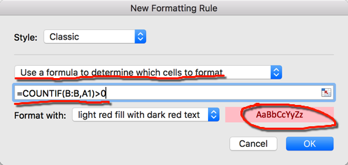
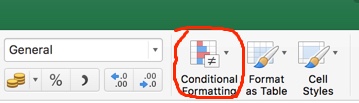
分别对两行建立条件公式,选中A列,条件“=COUNTIF(B:B,A1)>0”;选中B列,条件“=COUNTIF(A:A,B1)>0”,如下所示:


在处理工作时,常常遇到统计log,但如何高效的统计,常常需要度娘,而且查起来也很麻烦,所以统计到blog里,下次可以统一查阅:
参考文章请查看:https://zhidao.baidu.com/question/546059662.html
分别对两行建立条件公式,选中A列,条件“=COUNTIF(B:B,A1)>0”;选中B列,条件“=COUNTIF(A:A,B1)>0”,如下所示:


我的outlook是由“Exchange+本地文件夹”组成的,直接把下面整个文件夹备份就可以了,这里包含了你所有outlook的邮件,日历和本地文件夹,对于outlook 2016,请看最后部分
/Users/<user>/Documents/Microsoft User Data/Office 2011 Identities/Main Identity
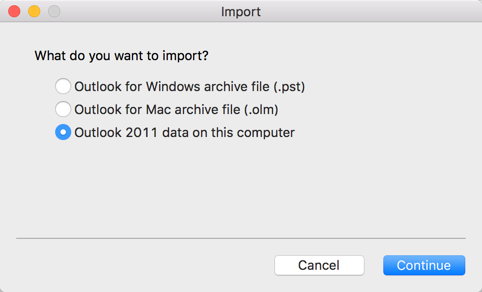
在新MAC上打开新的outlook,不要设置任何账号,然后选Tools中得Import:
完整阅读Not use ubuntu for long time… some useful commands had forgot, summary again:
1. Permit root login
gedit /usr/share/lightdm/lightdm.conf.d/50-ubuntu.conf –> “greeter-show-manual-login=true”
sudo passwd root
reboot
2. Change language
gedit /etc/default/locale –> change what do you want
reboot
3. Script couldn’t run on linux “bad interpreter: No such file or directory”
that should dos format, need change to unix format
vi xxx
check format by “:set ff” or “:set fileformat”
change format by “:set ff=unix” or “:set fileformat=unix”
:wq
4. Enable ssh service
sudo apt-get install openssh-server
gedit /etc/ssh/sshd_config –> “PermitRootLogin yes”
restart by “/etc/init.d/ssh restart”
check by “ps -ef|grep ssh”
reboot
5. Disable firewall
check whether enable by “ufw status”
disable by “ufw disable”
6. Change update source
sudo cp /etc/apt/sources.list /etc/apt/sources.list.bak
sudo vim /etc/apt/sources.list
sudo apt-get update
Refer to default source, can reference this article.
7. Change ip address, add/del GW route, add text to file
sudo ifconfig eth1 up
sudo ifconfig eth0 down
sudo ifconfig eth1 up 10.0.0.30 netmask 255.255.255.128
sudo route add -net 0.0.0.0/0 gw 10.0.0.126 dev eth1
sudo echo ‘nameserver x.x.x.x’ >> /etc/resolv.conf
8. Install DHCP Server
sudo apt-get install isc-dhcp-server
vim /etc/default/isc-dhcp-server
If customer want to focus a alarm on their NMS by SNMP Trap, they can config “snmp-server traps syslog”. But if customer no filter feature on NMS, they couldn’t find special alarm in all syslog, now we can use EEM + TCL to match customer requirement.
Follow TCL Script:
::cisco::eem::event_register_syslog pattern $_error_log occurs $_number period $_times maxrun 300 namespace import ::cisco::eem::* namespace import ::cisco::lib::* set alarm "***OOB_ERROR Happened!***" sys_reqinfo_snmp_trapvar var temp oid 1.1.1.1.1.1.1.1 string $alarm sys_reqinfo_snmp_trap enterprise_oid 1.3.6.1 generic_trapnum 6 specific_trapnum 2 trap_oid 1.1.1.1.1.1.1.1.1.1.1.1.1 trap_var temp
youtube上有个视频教程,做的很好,详细看下面链接:
https://www.youtube.com/watch?v=_O0Pac0a6g8
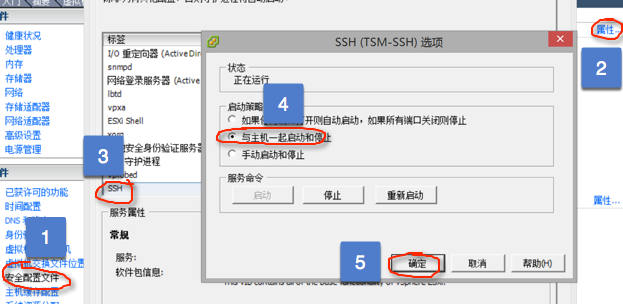
1. 开启ESXI的SSH:

完整阅读