Archive

‘学习笔记’ 分类存档

ASR9k load balance issue under L2VPN(VPLS/Eompls/ATOM)

Intro

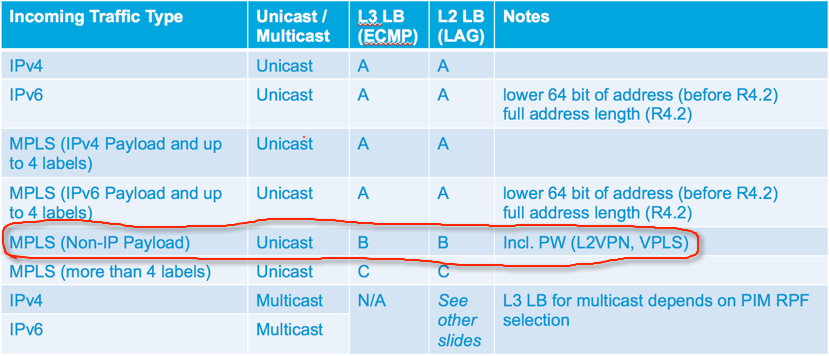
很多客户在部署VPLS时,当核心有负载链路或者Bundle时,常常会碰到负载不均的现象,为什么会发生这种问题?首先看下常规ASR9k在不同场景下是用什么元素去做Hash的:
9k-load-share-01

A: src-ip, dst-ip, src-port, dst-port, router_id
B: bottom_most_label, router_id
C: 4th_label, router_id

2020-6-24 更新:Multi-Label MPLS Load-Balancing Hash Algorithm Update

原有ASR9k ECMP的Hash 算法:在MPLS报文时,只有4层label以下的数据报文才可以使用IP 5元组Hash,超过4层的只能用单个label做raw hash。此算法在之前问题不大,label数很少超过4个,但在SR 的环境下,可能会有更多的label,因此BU更新了此场景的Hash算法:

  1. 5-8个label,不再使用单个label做hash,而是采用IP 5元组来做hash
  2. 9个或更多label,使用新的hash 算法:multi-label MPLS hashing,label3-5中的label作为raw hash

Tomahawk从623开始使用新的算法;Lightspeed和Xrv9k从652开始使用新的算法

Ok,我们可以看到在L2VPN中,用的是bottom label来做的负载均衡,这是因为系统无法跳过L2VPN中的MAC头,去读L3的IP头。在这里拿Bundle端口举例,说说不同场景下bundle的HASH方法(在9k上,所有HASH动作都是在进口NP上做的,这个HASH结果会直接被出口NP调用):
完整阅读
ASR1k OTV的三个时间戳

1. ARP的老化时间

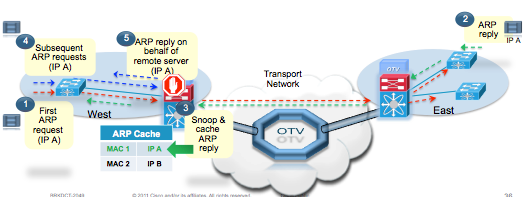
OTV有ARP suppress feature – ARP ND Cache,它只会允许通过第一个ARP,并记在缓存中,后续的到同样地址的ARP会被阻止,由OTV设备代理回复,这个时间是600s,10分钟,用”show otv detail“可以查看,这个时间不能更改,但可以关闭!在一些特殊的环境中可能需要!
otv-time-01

ASR1004-1#sh otv de | i ARP
 ARP Suppression Enabled  : Yes
 ARP Cache Timeout        : 600 seconds
ASR1004-1#
ASR1004-1#sh otv arp-nd-cache 
Overlay0 ARP/ND L3->L2 Address Mapping Cache
BD     MAC            Layer-3 Address  Age (HH:MM:SS) Local/Remote
16     1c1d.8646.5ec4 21.21.21.253     00:00:04       Remote

ASR1004-1(config)#int overlay 0
ASR1004-1(config-if)#no otv suppress arp-nd ?

完整阅读

ASR9k + Freeradius

Refer to IOX + Freeradius article that very less on Internet and lots of IOS with Freeradius, after study that, I summarized that by follow:

1: Install freeradius
You need install free radius first, ignore the part, you can check it by yourself or check my last article <RHEL7 install freeradius>

2: Config freeradius
clients.conf

[root@frank radius]# more /etc/raddb/clients.conf
client 10.x.x.x {
        secret = cisco123
        shortname = iox-5.2.2
        nas_type = cisco
}

users

Notes: as follow, we can assign a group for user “frank”, now priv5 is custom group, you can assign default group, e.g:
Cisco-avpair = “shell:task=#netadmin,#sysadmin,#cisco-support”

Btw, you can direct defined priv15 by follow:
Cisco-AVPair = “shell:priv-lvl=15”

Or direct defined cmd by follow:
Cisco-AVpair = “shell:cmd=show”

If you assign cisco-support group first, and then to limit command by “cmd=show”, cmd will unavailable; and vice versa.

[root@frank radius]# more /etc/raddb/users
frank   Cleartext-Password := "frank"
                Service-Type = NAS-Prompt-User,
                Reply-Message = "Hello!",
                Login-Service = Telnet,
                Cisco-AVPair = "shell:tasks*=#priv5,"

完整阅读

RHEL7 Install/Use Freeradius

原来一直在windows上用Freeradius,使用步骤简单,没仔细想工作原理,不过win版本总有些小问题。昨天把它装到RHEL7上了,折腾了一天,总算基本搞明白了里面的大概结构,如下所示:

安装部分

为了解决继承关系问题,最好安装做好的rpm包,对于freeradius有很多包,不用困惑,这是由于freeradius可以跟其他组件组合使用如LDAP或MYSQL等。我直接安装了一个干净的包,不带其他组件:
完整阅读

PWHE Example on ASR9k

什么是PWHE?Pseudowire Headend,它类似于BVI,由于BVI有很多限制,所以研发了PWHE,它会利用进口的硬件资源,从而执行更多硬件级别的feature,如进出QOS等,而且BVI在一台chassis上只能支持2000个,而PWHE则更多。

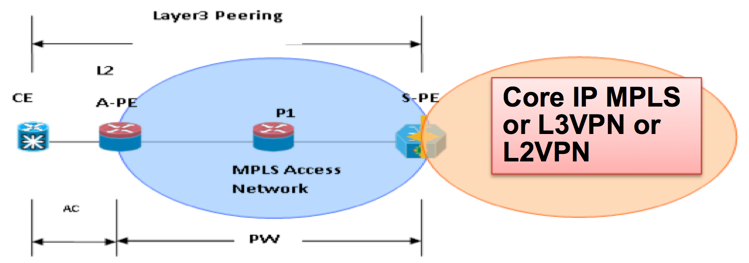
那么PWHW/BVI需要部署在什么场景下呢?如下图所示:

pwhe-topology
完整阅读

blonde teen swallows load.xxx videos