Troubleshooting IPoE Session that pending at “ACK-DPM-WAIT”
Introduction
The article will talk about what is “ACK-DPM-WAIT”, and how to troubleshooting the similar scenario. Due to limitation info that couldn’t narrow down, in my CASE, so will update the article if the issue happen again and find RCA.
Problem Description
Version: 5.1.3 + induvial SMU
Platform: 9010 + Mod80 + A9K-MPA-4X10GE
BNG: IPOE, DHCP Proxy, 28k session
My customer found part of BNG session was failure. Trigger is due to customer power supply have issue that cause the asr9k re-power. After 9k reload, found dhcpd and arp have so many alarms, dhcpd was recovery after tried restart process multi times, but arp continue have SPIO alarm even if tried restart process, customer had enabled arp local disable on the BNG port.
The issue sessions got address correct from DHCP, but session would be deleted after 15min. After checked on asr9k, we found issue session pending on ACK_DPM_WAIT status. And the issue was auto recovery at approx.19:00-19:30. And at that timeslot, arp alarm disappear too.
There are some info:
#sh ipsubscriber summary
Mon Sep 11 10:21:53.790 Beijing
IPSUB Summary for all nodes

Interface Counts:
                                    DHCP  Pkt Trigger
                              ---------- ------------
                     Invalid:          0            0
                 Initialized:          0            0
    Session creation started:          0            0
    Control-policy executing:          0            0
     Control-policy executed:          0            0
    Session features applied:        361            0  <<<
              VRF configured:          0            0
            Adding adjacency:          0            0
             Adjacency added:          0            0
                          Up:      28338            0
                        Down:          0            0
                     Down AF:          0            0
            Down AF Complete:          0            0
               Disconnecting:          0            0
                Disconnected:          1            0
                       Error:          0            0
                              ---------- ------------
                       Total:      28700            0

#sh dhcp ipv4 proxy binding | exclude BOUND
Mon Sep 11 10:32:48.477 Beijing
                                           Lease
 MAC Address      IP Address      State    Remaining       Interface          VRF      Sublabel
--------------  --------------  ---------  ---------  -------------------  ---------  ----------
......
xxx.xxx.xxx     10.10.xx.41     ACK_DPM_WAIT 58         BE1.11            default    0x12ec3c
xxx.xxx.xxx     10.10.xx.179    ACK_DPM_WAIT 58         BE1.11            default    0x12f9b6
xxx.xxx.xxx     10.10.xx.116    ACK_DPM_WAIT 58         BE1.11            default    0x130046
xxx.xxx.xxx     10.10.xx.133    ACK_DPM_WAIT 58         BE1.11            default    0x1304b8
xxx.xxx.xxx     10.10.xx.152    ACK_DPM_WAIT 58         BE1.11            default    0x1305ba
xxx.xxx.xxx     10.10.xx.53     ACK_DPM_WAIT 58         BE1.11            default    0x13071c

#sh dhcp ipv4 proxy binding sum
Mon Sep 11 10:36:59.657 Beijing

Total number of clients: 28528

     STATE                |     COUNT     |
------------------------------------
  INIT                    |            0  |
  INIT_DPM_WAITING        |            0  |
  SELECTING               |            0  |
  REQUESTING              |            0  |
  REQUEST_INIT_DPM_WAITING|            0  |
  ACK_DPM_WAITING         |          307  | <<<
  BOUND                   |        28065  |
  RENEWING                |            0  |
  INFORMING               |            0  |
  REAUTHORIZE             |            0  |
  DISCONNECT_DPM_WAIT     |           33  |
  ADDR_CHANGE_DPM_WAIT    |            0  |
  DELETING                |            6  |
Configuration
DHCP
-------------------------
dhcp ipv4
 profile vod proxy
  allow-move
  helper-address vrf default x.x.x.x giaddr 0.0.0.0
 !
 interface Bundle-Ether1.11 proxy profile vod
!

Dynamic Template
-------------------------
dynamic-template
 type ipsubscriber vod-profile
  ipv4 unnumbered Loopback 1111
 !
!

Port Config
-------------------------
interface Bundle-Ether1.11
 ipv4 point-to-point
 ipv4 unnumbered Loopback 1111
 arp learning disable
 service-policy type control subscriber vod-sub
 ipsubscriber ipv4 l2-connected
  initiator dhcp
 !
 encapsulation ambiguous dot1q any second-dot1q any
!

IPoE Loopback Config
-------------------------
interface Loopback0
 ipv4 address 10.10.xx.1 255.255.0.0
 ipv4 address 188.xx.xx.1 255.255.0.0 secondary
!
# if end user expired, dhcp will deliver this address
# as follow policy, 188 network will drop

IGP at uplink side
-------------------------
prefix-set expired-1
  188.xx.xx.0/16
end-set
!
route-policy expired
  if destination in expired-1 then
    drop
  else
    pass
  endif
end-policy
!
router ospf 123
 router-id x.x.x.x
 nsf cisco
 area 0
  interface Bundle-Etherx # uplink
  !
 !
 area 456 # put the IPoE newtwork to stub area
  route-policy expired out
  interface Loopback 1111
   loopback stub-network enable
  !
 !
!

IPoE Policy
-------------------------
class-map type control subscriber match-any classical-protocol
 match protocol dhcpv4
 end-class-map
!
policy-map type control subscriber vod-sub
 event session-start match-first
  class type control subscriber classical-protocol do-until-failure
   1 activate dynamic-template vod-profile
  !
 !
 end-policy-map
!
“ACK_DPM_WAIT” and “LEASE_DPM_SUCCESS”
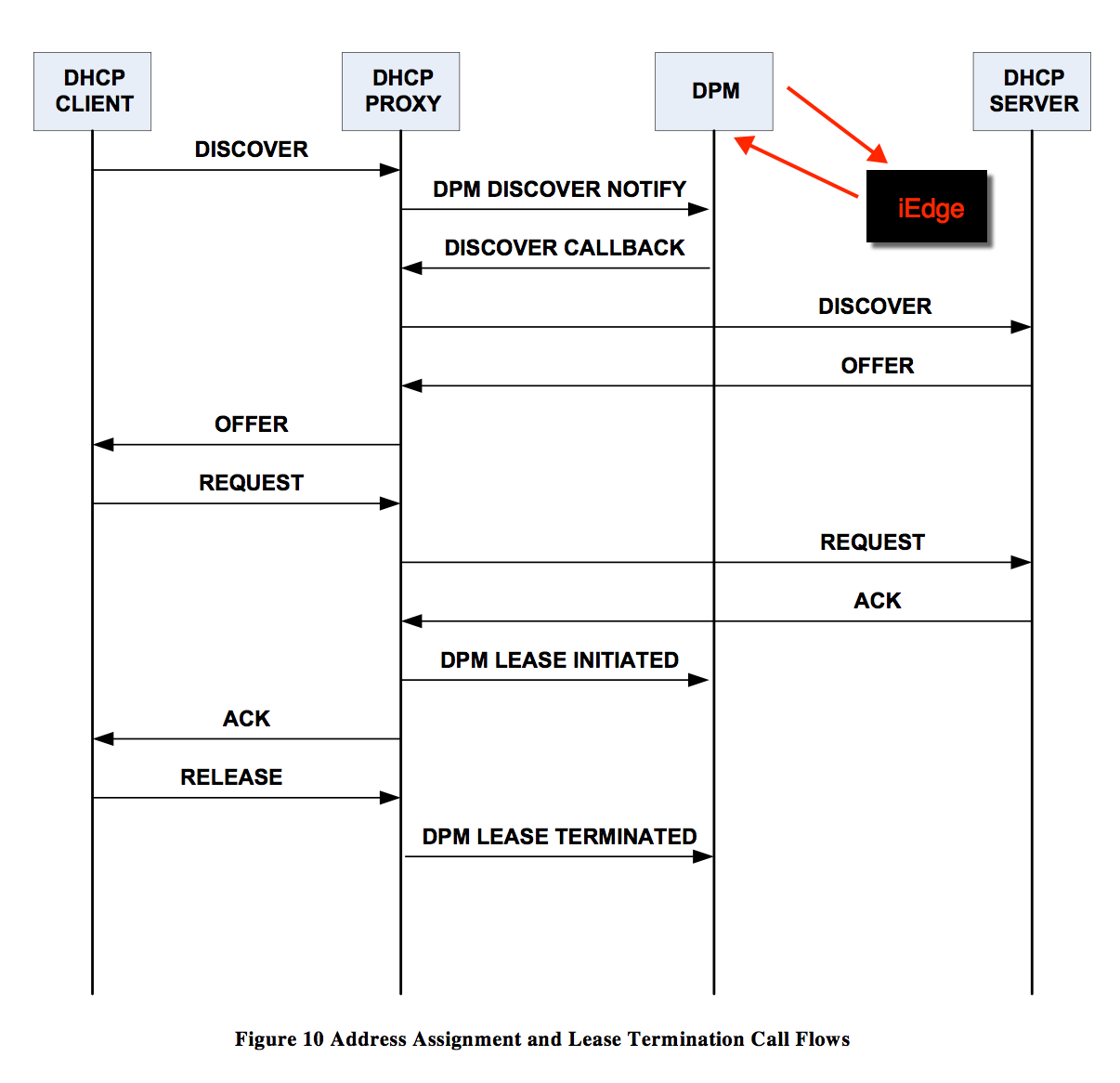
For ACK_DPM_WAIT: iedge taking more time to respond to dhcp, that is why session is in ACK_DPM_WAIT state for long time, the reason for iedge giving late respond may be caused due to the iedge client responding late. refer to iedge client, we need BU help analyzing from idege tech/trace.
For LEASE_DPM_SUCCESS: that is from the time discover comes to the dhcp till the time iedge responds final update to the dhcp, that mean iedge complete it task, so talk to dhcp, so set LEASE_DPM_SUCCESS status, that is normal flag.
Session will up and set LEASE_DPM_SUCCESS If iedge pending time < 5min; if iedge pending time > 5min, it will notice dhcp to disconnect the session. We can check follow call flow that can help clear to understand:
Action Plan
After discussed with iEdge Team, we need follow infomraiton when issue happened again
Check iEdge status by follow command
Show process blocked
Show process iedged location all
Show subscriber infra readiness
Show tech subscriber (for iedge and dhcp point of view)
Show tech arp
Monitor one issue session by follow commands from up to down
show dhcp ipv4 proxy binding mac-address xxx.xxx.xxx
show dhcp ipv4 proxy binding | i xxxx.xxxx.xxx
sh im database interface Bundle-Etherxx.xxxx.ipxxxxx
We need follow an issue STB and capture the packets from up to down that will help us to check what’s happen.
版权声明:
本文链接:Troubleshooting IPoE Session that pending at “ACK-DPM-WAIT”
版权声明:本文为原创文章,仅代表个人观点,版权归 Frank Zhao 所有,转载时请注明本文出处及文章链接