17 7 月, 2019
Seperate RPM Pacakage
Check now version
Due to now version include multi packages, so you must include those packages when you upgrade:
RP/0/RP0/CPU0:R31#show ins ac sum
Fri Mar 29 02:35:01.477 UTC
    Active Packages: 9
        ncs5500-xr-6.6.1 version=6.6.1 [Boot image]
        ncs5500-isis-2.1.0.0-r661
        ncs5500-li-1.0.0.0-r661
        ncs5500-mcast-2.1.0.0-r661
        ncs5500-mpls-2.1.0.0-r661
        ncs5500-mpls-te-rsvp-3.1.0.0-r661
        ncs5500-ospf-2.0.0.0-r661
        ncs5500-mgbl-3.0.0.0-r661
        ncs5500-k9sec-3.1.0.0-r661
Check Storage Space
Whether harddisk/disk have enough space, please remove unuse file and tem file in disk/harddisk
完整阅读
15 7 月, 2019
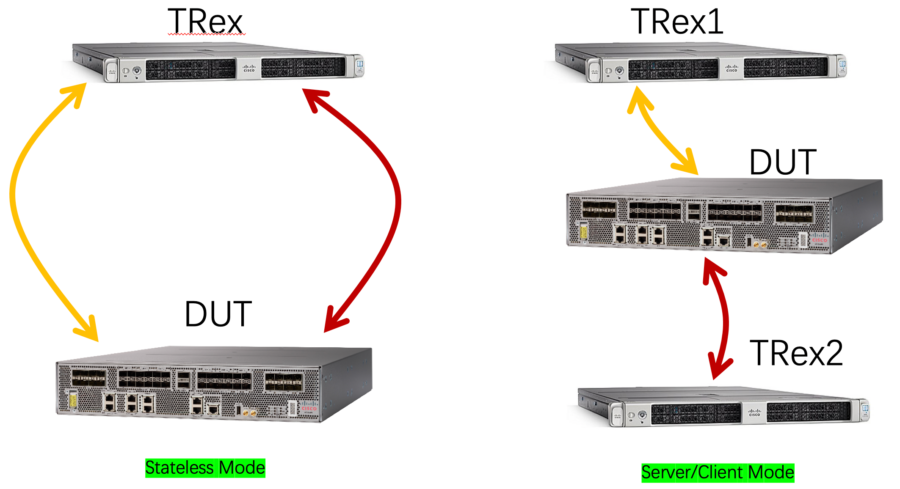
TRex based on DPDK, have high performance for traffics generator scenario. TRex has two deployment scenarios, one is Stateless mode, another is Server/client mode. How different for them? As follow pic. Btw, TRex has a GUI tool that can easy config traffic pattern, but that only support in Stateless mode. For Server/Client mode, only CLI (you can reference “Linux SRv6实战 (第三篇) 多云环境下Overlay(VPP) 和Underlay整合测试 ” that use Server/Client mode). For the article, only focus on stateless mode and GUI tool.
完整阅读
28 6 月, 2019
My VPS(Bandwagon) include OpenVPN script, but only support Centos6.x that version not good for docker (my blog deploy by docker Blog顺利完成搬家之Bandwagonhost VPS), so need to do by other scripts. OpenWRT config OpenVPN client has some different, so summary the info to the article for review.
But due to GFW, OpenVPN couldn’t establish at last, reset happened between server and client, but the setup should workable.
Deploy OpenVPN at Server
Don’t know why couldn’t find OpenVPN pacakage by yum, even if have epel source
[root@frank ~]# rpm -qa |grep epel
epel-release-7-11.noarch
[root@frank ~]# yum install openvpn
Loaded plugins: fastestmirror
Loading mirror speeds from cached hostfile
 * base: mirrors.usc.edu
 * extras: repos.lax.quadranet.com
 * updates: mirror.fileplanet.com
No package openvpn available.
Error: Nothing to do
完整阅读
21 6 月, 2019
Config call-home that active smart license
xrv9k should have some default call-home, in some scenario, need to add some extra configuration, as follow:
domain name cisco.com
domain name-server x.x.x.x  >>> dns server
call-home
 service active
 contact smart-licensing
 http-proxy y.y.y.y port 80  >>> proxy server
 profile CiscoTAC-1
  active
  destination transport-method http
 !
!
Add crypto config
conf
crypto ca trustpool policy crl optional
commit
完整阅读
2 4 月, 2019
For detail info, please refer to following Akshat’s article, for my article only simply summary step to build openr on ncs5500. Thanks Akshat’s help for the openr set up 🙂
https://xrdocs.io/cisco-service-layer/blogs/2018-02-16-xr-s-journey-to-the-we-b-st-open-r-integration-with-ios-xr/
1. Set up the private insecure registry on your server
Refer as follow:
https://docs.docker.com/registry/deploying/
https://xrdocs.io/application-hosting/tutorials/2017-02-26-running-docker-containers-on-ios-xr-6-1-2/#private-insecure-registry
[root@nso ~]# nano /etc/yum.repos.d/docker.repo
[root@nso ~]# yum install docker-engine
[root@nso ~]# systemctl start docker
[root@nso ~]# docker run -d -p 5000:5000 --restart=always --name registry registry:2
[root@nso ~]# docker pull akshshar/openr-xr
[root@nso ~]# docker ps -a
CONTAINER ID        IMAGE               COMMAND                  CREATED             STATUS              PORTS                    NAMES
c4636568f48a        registry:2          "/entrypoint.sh /e..."   6 minutes ago       Up 6 minutes        0.0.0.0:5000->5000/tcp   registry

[root@nso ~]# docker images
REPOSITORY          TAG                 IMAGE ID            CREATED             SIZE
registry            2                   f32a97de94e1        13 days ago         25.8MB
akshshar/openr-xr   latest              b51c260b060e        2 months ago        1.76GB

[root@nso ~]# docker tag akshshar/openr-xr 10.75.58.72:5000/openr-xr
[root@nso ~]# docker images
REPOSITORY                  TAG                 IMAGE ID            CREATED             SIZE
registry                    2                   f32a97de94e1        13 days ago         25.8MB
akshshar/openr-xr           latest              b51c260b060e        2 months ago        1.76GB
10.75.58.72:5000/openr-xr   latest              b51c260b060e        2 months ago        1.76GB
[root@nso ~]# docker push 10.75.58.72:5000/openr-xr
The push refers to a repository [10.75.58.72:5000/openr-xr]
Get https://10.75.58.72:5000/v1/_ping: http: server gave HTTP response to HTTPS client
[root@nso ~]#
2. Add follow at “/etc/sysconfig/docker”
After changing the docker opts, please wait some seconds, docker will auto restart.
DOCKER_OPTS=" --insecure-registry 10.75.58.72:5000"
完整阅读