29 9 月, 2019
Awesome upgrade cmd for eXR, that will help customer simplify upgrade procedure and do upgrade automation! Feature release from 652. Just tested and summarized.
I summarized normal upgrade eXR version by install add/prepare/active at former: Upgrade/Install Packages in eXR. For the article, will summary how to upgrade by install replaced.
“Install replaced” is a new cmd that help customer upgrade only by one cmd, don’t need to add/prepare/active steps, that only support by GISO. What is GISO? That is an image bundle, customer can flexibly customize the image, e.g only bundle: ISIS rpm + mini iso + k9 rpm + configuration to one GISO, more GISO information, please check CCO Doc: Flexible Packaging Configuration Guide for Cisco NCS 5500 Series Routers
PS: “Install replaced” that will not affect running configuration, and auto removes inactive rpm, and commit.
Build GISO
完整阅读
10 8 月, 2019
Ixia updates NexGen framework in IxNetwork, that is great function and help tester simplified workload, but looks like the function couldn’t completely automate, e.g when you config local address, GW address couldn’t auto-generate, you must manually change that, that should ok, everybody should fix that~ 🙂 But some issue will waste your time to troubleshooting. Summary two issues for the article that will help you fast to fix similar issues.
My IxNetwork version is 7.40.929.28.GA, GA version, wish to fix those issues at MR version 🙂
MALFORM update error on NCS5500
完整阅读
9 8 月, 2019
For the artical, will summary how to mpls over gre on NCS5500, NCS5500 only enable decap mode of GRE(6.1.x support the feature), that feature will flexible terminal GRE session that from DC servers. Btw, in order to verify packets from the tester, will capture packets by ERSPAN on NCS55A1.
Topology
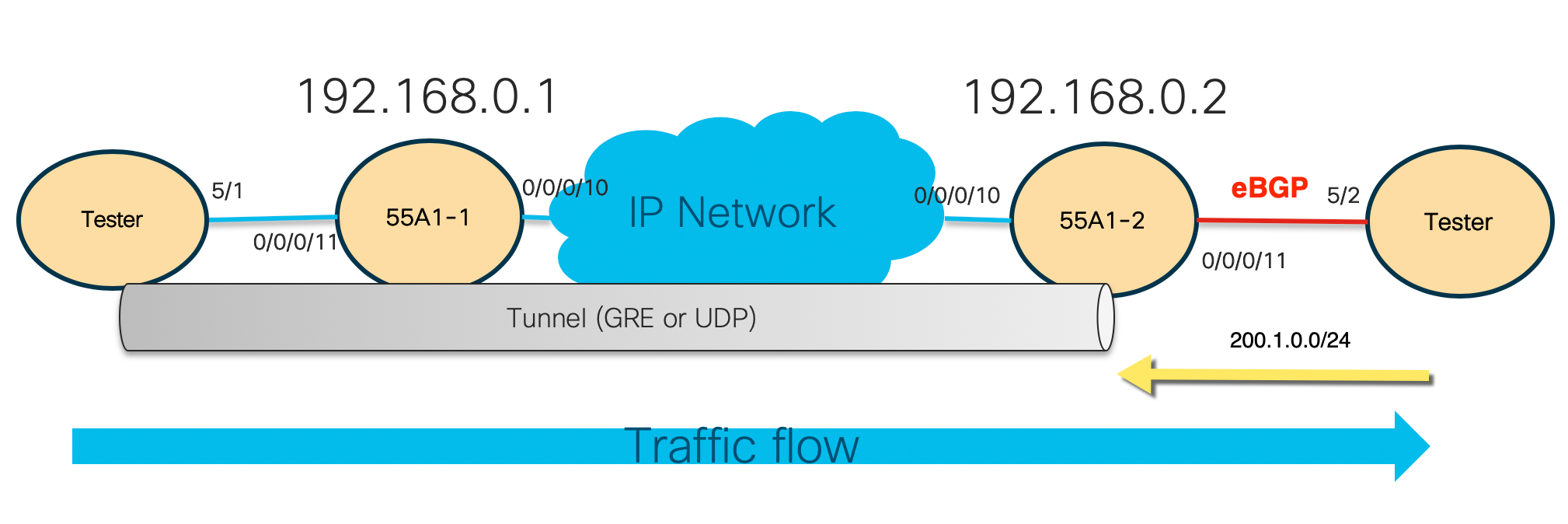
- NCS55A1-2 learn eBGP route 200.1.0.0/24 from tester 5/2
- Ony IPv4/IGP forwarding from Terster 5/1 -> 55A1-1 -> 55A1-2
- Send traffics(GRE + EPE ) from tester 5/1, and terminate at NCS55A1-2, then forward to EPE link
完整阅读
7 8 月, 2019
Not update any NSO article to my blog, I will put more NSO info to here, wish that will help more guys. The article will include more hands-on experiences, help beginner fast connect xr devices with nso by cli or netconf ned. For netcong NED, build by Pioneer at former, that need to manual exclude the Yang file that no support. In the article, will build netconf ned by native tool of NSO 5.2.0.
Platform Info
[root@nso opt]# ncs --version
5.2.0.1
[root@nso opt]# cat /etc/redhat-release
CentOS Linux release 7.6.1810 (Core)
RP/0/RP0/CPU0:frank#show ins ac sum
Wed Aug  7 01:53:03.286 UTC
    Active Packages: 1
        xrv9k-xr-6.6.3.14I version=6.6.3.14I [Boot image]
完整阅读
18 7 月, 2019
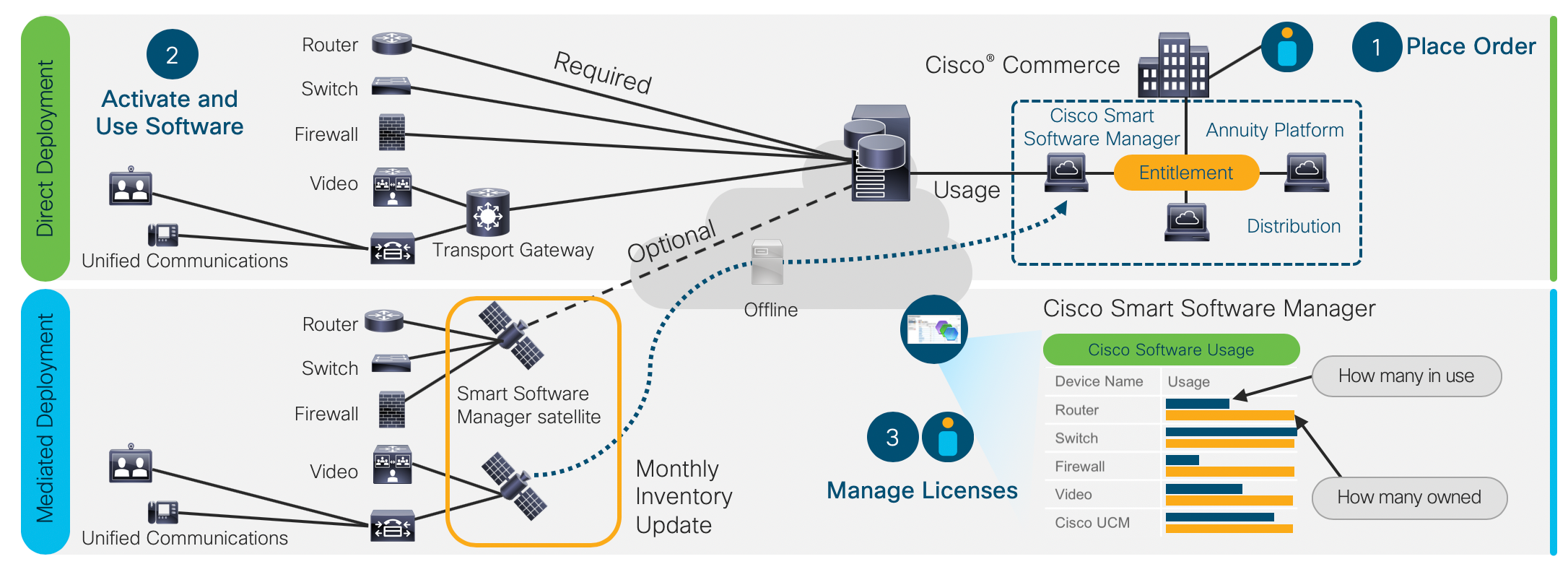
At last article Direct activate XRv9k Smart License, I summarized how to direct activate XRv9k Smart License. Before doing that, XRv9k must be able to access the Internet(Cisco License web). Same as follow picture “Direct Deployment”. But some customers couldn’t let devices access the internet due to security. So we must activate the smart license in another way. That is Smart Software Manager satellite, same as “Mediated Deployment” in the following picture.
完整阅读