At some times, we only have a qcow2 image, but ESXI(vCenter) only supports vmdk, how to do deploy? In the video guide, I will show how to convert img to vmdk from qcow2, then deploy by import exist hardware(vmdk).
Btw, xrv9k supports only 3 virtual interfaces: e1000, virtio, and VMXnet3. Please notices not support e1000e!
PS: Compile Server base on “focal-server-cloudimg-amd64.vmdk”, 20200706 update.
General Config on ubuntu
Config port by new “ip” cmd, and DNS
root@server-test:/opt# ip addr add 10.75.37.59/24 dev ens4
# config addr for one port
root@server-test:/opt# ip addr del 172.16.1.163/24 dev ens3
# delet addr for one port
root@server-test:/opt# ip addr
# equal with ifconfig
root@server-test:/opt# ip link set ens4 up
# up one port
root@server-test:/opt# ip -s link ls ens4
# cool cmd, check RX/TX packets, errors, dropped, overrun, mcast
root@server-test:/opt# ip route add default via 10.75.37.1
# config default route
root@server-test:/opt# ip route
# check v4 route table
root@server-test:/opt# ip -6 route
# check v6 route table
root@server-test:/opt# echo 'nameserver 64.104.123.144' > /etc/resolv.conf
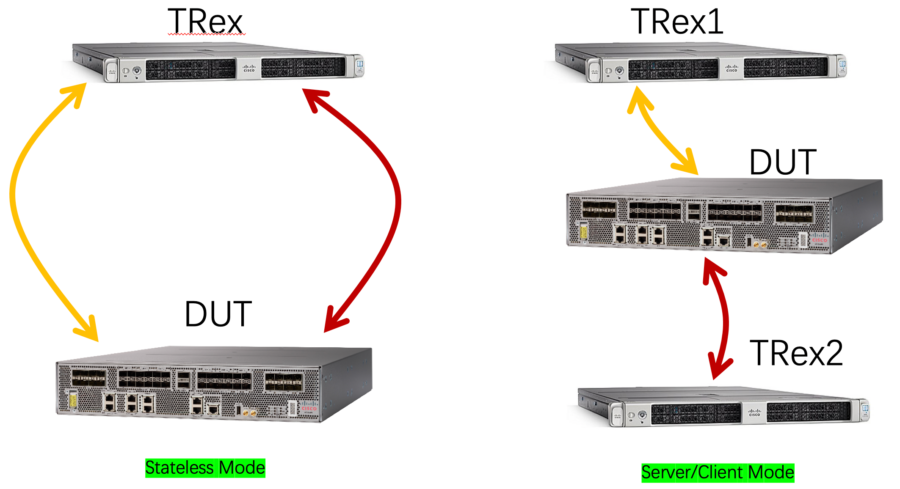
TRex based on DPDK, have high performance for traffics generator scenario. TRex has two deployment scenarios, one is Stateless mode, another is Server/client mode. How different for them? As follow pic. Btw, TRex has a GUI tool that can easy config traffic pattern, but that only support in Stateless mode. For Server/Client mode, only CLI (you can reference “Linux SRv6实战 (第三篇) 多云环境下Overlay(VPP) 和Underlay整合测试 ” that use Server/Client mode). For the article, only focus on stateless mode and GUI tool.