Now Cisco had integrated BNG feature to XRv9000 platform in new version (from 631), that can let customer integrade the feature in their NFVI Infrastructure, that will flexible deploy the BNG in same Server Box. And the article will set up a simple vBNG environment that build by VIRL + XRv9000, and simple test IPoE/PPPoE. That environment will help you to easy TS vBNG PI issue, and packets paths.
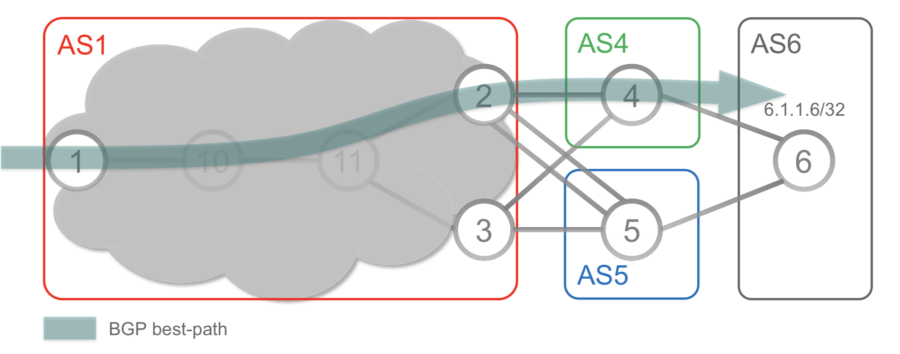
Now more customer complains their Peering network not flexible and hard to control, that will cause peering link’s utilization not balance and waste of resources. As follow the example on Router-2, customer peering device connect to multi ISP, each ISP sends full internet route, select only based on the BGP. BGP select rule only based on the route but not real traffics, that may be cause port-A’s traffics have 8G, but port-B and port-C only have 4G, if want to adjust BGP select, only change RPL that more complex, and due to route from internet and multi ISP, so route maybe change at some time, in order to balance peering link, customer must continue to adjust their RPL.
Could we have more flexible and simplest way to resolve the issue? The answer is Yes 🙂 we can achieve the task by Segment Routing – Egress Peer Engineering. Now some customer had deployed the solution, that combine NetFlow, Openbmp to check AS/traffics of prefix, then send BGP LU(EPE label) to ingress node, and easy to control traffics.
I installed the WAE 6.4.5 at formal and summaried to Blog, e.g: INSTALL CISCO WAE 6.4.5. After 7.0, install/config have big change and similar with NSO that easy/module to deploy. For this article, only talk about how to install and enable.
Auto source profile
Similar with NSO, add “source” command to “.bash_profile” that in MacOS. That will let you direct to login to WAE but not do “source wae711/waerc”, as follow: